Keep the family. Lose the repetition.
Less storage than five self-contained deployments in the measured model-and-adapter family.
Install once · one model library
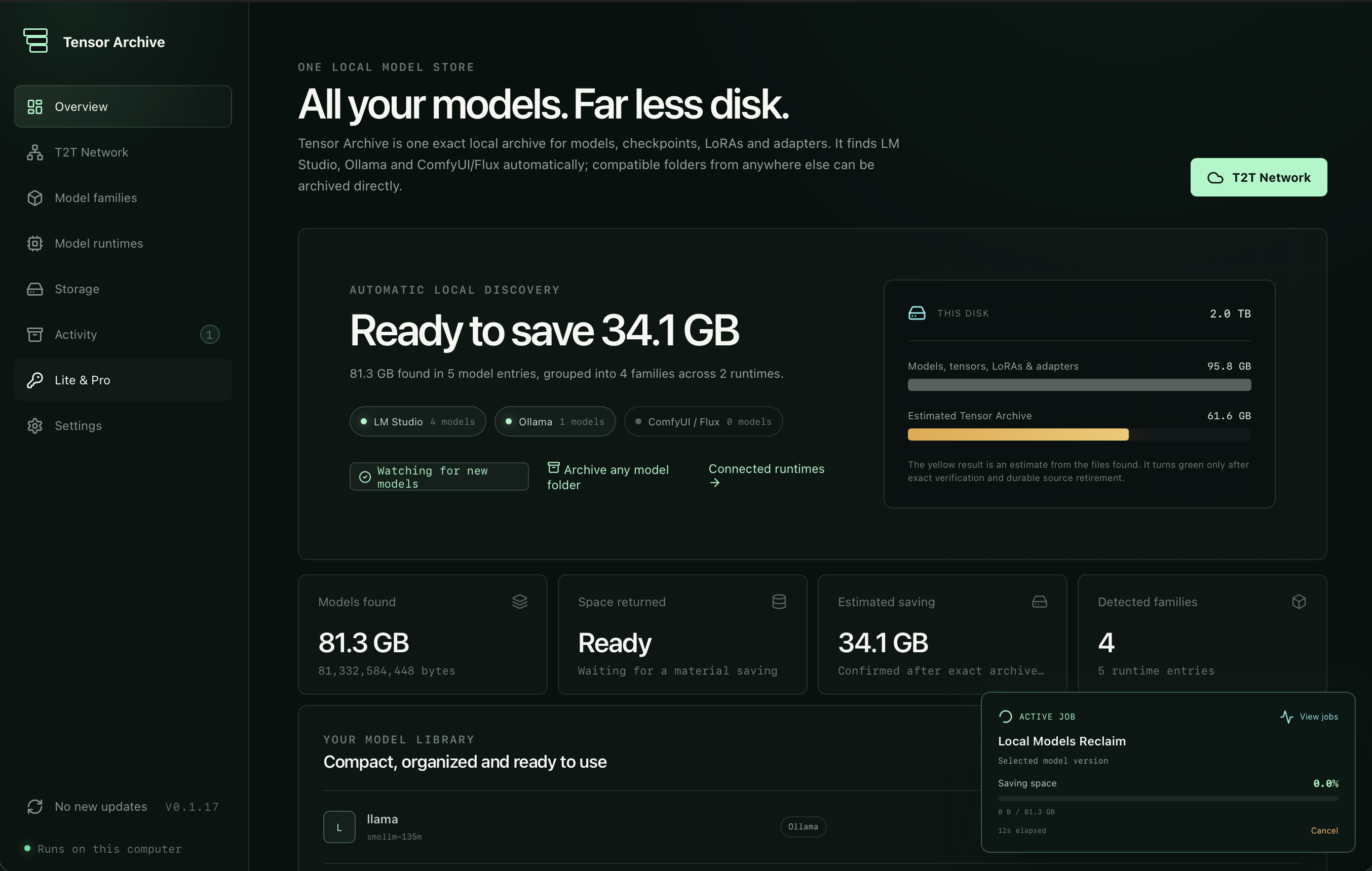
Connect your model folders once and stop sorting files by hand. Tensor Archive organizes models, quantizations, LoRAs and adapters into exact, lossless families, ready when your model apps need them.
Powered by U.S. Patent-Pending Technology
Less storage than five self-contained deployments in the measured model-and-adapter family.
Less peak packaging memory than ZipLLM on the same TA-Bench v1 source data.
Bytes differed after restoring all 50 files in the sequential-checkpoint validation.
Install it. Point it at your models. Forget the folders.
Tensor Archive groups related model files, stores their shared data once and prepares the exact version a connected runtime needs. After use, the temporary working copy can be reclaimed without losing the model.
Connect your model folders. Related models, quantizations, LoRAs, adapters and checkpoints become clear families.
Tensor Archive stores repeated model data once while preserving every file and every byte needed for exact recovery.
The exact archived version is materialized and handed to the connected runtime when you want to load it.
Unload safely, recover the temporary working space and keep the exact model packed for its next request.
BERT Tiny plus three adapters. Every version restored exactly.
Already using LM Studio, Ollama, FLUX or ComfyUI? Keep one compact library behind them all. Tensor Archive prepares the exact model each app requests, then safely reclaims its working copy.
Try it on your model libraryOne storage layer behind your model apps
Install it once. Tensor Archive automatically organizes and losslessly compresses your models, LoRAs and adapters into one compact library. When an integrated app asks for one, the exact version is prepared on demand and compacted again after use.
 Available now
The new Bionic from LM Studio made us not think twice about fully integrating Tensor Archive to enable dynamic model loading: compact unused models, keep many versions organized, and use the best model for every task—hassle-free.
Organize · prepare · load · reclaim Ollama
Available now
Ollama
Available now
Ollama runs models the way engineers expect: fast, scriptable, and API-first. Where others focus on the chat window, Ollama focuses on the model workflow. Tensor Archive belongs there: compress, organize, and load the best version for each job—automatically.
Fast · scriptable · automatic Available now
FLUX is where image models and LoRAs multiply fast—and disk space disappears faster. We integrated Tensor Archive so every checkpoint and adapter stays losslessly compressed, clearly versioned, and ready to load without the usual mess.
Lossless · versioned · ready to load ComfyUI
Available now
ComfyUI
Available now
ComfyUI runs serious visual pipelines—and serious model collections. Tensor Archive keeps those checkpoints and LoRAs compact, organized, and instantly usable, so you build workflows instead of managing folders.
Checkpoints · LoRAs · workflowsLite can receive and restore T2T model families for free. Your private archive remains local; network participation is explicit and private by design.
33.02 seconds for Tensor Archive versus 105.65 seconds for Gear CDC on the same source bytes, with exact restoration. One controlled run, not a universal speed guarantee.
Measured on the models people actually keep
Two Qwen2.5 families show the storage reclaimed at compact and 7B scale. The product loop was then validated end to end in LM Studio.
Three quantizations · Q4_K_M, Q5_K_M and Q6_K
60.8% less physical storageFour quantizations · nine complete GGUF shards
6.26 GB reclaimed · 24.9% lessActivate, register, load, generate, unload and safely evict. A loaded model cannot be evicted, and every protected shard restores byte for byte.
Separate TA-Bench model-family workload, not the Qwen GGUF results above. Xet uses the official xet-core v1.5.4 local reference CAS; ZipLLM uses the smallest exact-restorable closure independently verified.
Don’t trade disk pressure for memory pressure
Large model files do not need large memory spikes. On the same TA-Bench v1 dataset Tensor Archive peaked at 52.4 MB, versus 1,523 MB for ZipLLM.
Two separate proofs. The 96.6% comparison uses the shared TA-Bench v1 corpus. The 31.7 GB run validates Tensor Archive alone; ZipLLM was not run on that large file.
Inspect the memory evidenceMac Studio storage economics
Apple charges for factory storage once. Tensor Archive earns that space back across every related model family. If your family matches our measured 71.2% result, a smaller SSD tier can hold the same versions.
Lite automatically keeps downloaded models compact, expands them when needed and compacts them again after use. T2T delivery is free too. Pro adds offload, letting you move the model archive off your disk entirely.
Illustrative equivalent capacity, not general disk compression. The 71.2% result comes from five related self-contained model deployments; results vary by family. Apple pricing is the current U.S. Mac Studio M4 Max factory-storage ladder, checked July 27, 2026, before tax. Check Apple’s configurator ↗
The numbers answer different questions
Storage, memory and integrity are measured independently. Every result below names its workload and comparison so the numbers never have to rely on fine print.
Five self-contained model-and-adapter deployments compared with the same family in Tensor Archive.
Five BF16 model checkpoints on the same TA-Bench v1 source bytes, with exact restore.
ZipLLM and Tensor Archive packaging the same TA-Bench v1 model family.
The public model suite also reclaimed 76.33–76.46% across BERT Tiny, DistilBERT Base and SmolLM2 135M. Results vary with how closely related the versions are.
The technical signal
Five sequential BF16 training checkpoints. Same 4.06 GB source, same files, exact restoration. Tensor Archive used 964.5 MB less physical storage than normalized Gear CDC.
Restore ratio is measured against the exact fixed-chunk control; below 1× means no observed slowdown in this replay. This is one controlled workload, not a universal claim.
TA-Bench v1 · direct comparison
Five sequential BF16 checkpoints from one frozen training run. Every scored system receives the same files; every bar is measured physical storage, including the metadata required to restore them.
5 model files
1.345 GB source
Five complete versions
4.060 GB source
FM-Delta is N/A because its official codec does not accept this BF16 corpus. DCP belongs in a native semantic-state track. Gear CDC is a normalized byte-level control, not a claim about the hosted Xet service. ZipLLM's default workspace retains raw and compressed tensors; our primary comparison uses the smallest subset we verified still restores every file exactly, not an official ZipLLM garbage-collection mode.
Storage run 001 · corpus manifest bfa502…3ce81 · every scored restore
byte-exact. Full Tensor Archive timing repetitions and independent reproduction remain pending.
No benchmark theatre
The public suite compares five self-contained deployments per family and reclaimed 76.33–76.46% across BERT Tiny, DistilBERT and SmolLM2. It is separate from TA-Bench: the direct result above compares Tensor Archive, ZipLLM, zstd and CDC on one frozen sequential model family.
Inspect the public metric recordPrivate by design
Tensor Archive runs locally. It does not need destructive quantization or a cloud upload to reclaim space, and T2T participation never turns your private model library into a public hub.
Your archive and model files remain on infrastructure you control.
Verification and SHA receipts prove that restored files match their source.
A model in use cannot be evicted. Unload it first, then reclaim the cache.
Receive compact, verified model families through the distributed network while your private archive stays under your control.
Also from Tensor Archive
Tensor Archive Games reclaimed 51.92% of the durable storage occupied by our measured 12-title PC library—while keeping every restore exact and Steam in control.
Tensor Archive Games · Reclaim game drive spaceWorking product · Available now
Connect your model folders once. Tensor Archive organizes the families, shows what you can reclaim and keeps the exact version your runtime needs ready on demand.
macOS · Windows · Linux · 100% lossless · private by design